Manual
What is it ?
pydevmgr_elt package has two modules :
pydevmgr_eltdetailed in this documentation. Tools dedicated for ELT low level framework devices communication.So far Motor, Drot, Adc, Shutter, Lamp are natively included with in addition the CcsSim and Time.
pydevmgr_elt_qtprovides simple Widgets and guis for some ELT devices
Note
About versions Up to v0.5.x version pydevmgr_core, pydevmgr_ua and pydevmgr_elt has involved in a way that break backward compatibilities. From v0.5 I will try my best to avoid any majore backward compatibility break.
The deprecated version 0.2 of this module was included in a pydevmgr package. Now, the package is independant and using two other subpackages pydevmgr_core core engine for pydevmgr and pydevmgr_ua for generic OPC-UA com
In its current version 0.5.X, pydevmgr_elt is a separated module from pydevmgr_core and pydevmgr_ua.
to communicate with the OPC-UA server.
If you do not know what is ELT software, this page is probably not for you.
In short pydevmgr_elt provides python objects to communicate directly to PLCs ELT devices via OPC-UA.
pydevmgr_elt is a Python module to be used as substitute of a real device manager running in a ELT-Software environment.
pydevmgr_elt is not intended to be ran under a ELT software devenv but instead to replace it for some use cases during AIT, test and lab activities. Basically for intermediate hardware test for which it does not make sens to setup a full ELT instrument workstation. It does basically replace the ELT software device manager python client when it is not available. It was designed to be used by non-software engineers in order to easily scrips sequences to integrate, tune and control hardwares.
pydevmgr_elt was mainly developed with the following goal in mind :
Building AIT and integration scripts when the ESO high level framework cannot be used or is not ready. Typicaly, for instance, when one have a test bench with some motors ans wants to do some scripts in order to characterise the hardware.
Build Engineering tools and small guis which can be run from any computer and can be edited by non-software engineers during hardware integration or lab experiments.
Prototyping and testing of special devices writing down the basic skeleton of special devices at early development phase in a friendly python environment before being translated to a real ELT-Framework compatible special device.
Use simple GUIs to drive standard or custom ESO devices from any computers. For instance, useful when electronics and PLC setup is done separately in an other institute but wants to script some motor movements.
pydevmgr_elt can use the YAML configuration files as defined by ESO (in ELT software version 2&3) to communicate with the PLC through OPC-UA. This allows to reuse those configuration files directly in the ESO fcf software. However the use of configuration file is not necessary.
Note that in future update of the ELT CII this configuration files will no longer be valid, I guess, but it should not be a problem as long as low level software is unchanged, pydevmgr_elt will still work, only the ability to copy past configuration files will be lost, not a big deal.
A tins, a test instrument, is included in the source package. It contains the yaml files and a running PLC project. The PLC project is not documented, see ESO FCS webpage for more information. The Example in the documents are given for the “tins” but are adaptable to any configurations.
In the following doc Examples, it is assumed that the tins is running on a OPC-UA server. One can easily
adapt the Example from any working projects. Also it is assumed that the yml files of the tins are accessible through
the $CFGPATH environment variable and they are edited to match the current hardware configuration (address,
namespace, etc).
Install
Package
With pip:
> pip install pydevmgr_elt
To see the last version : https://pypi.org/project/pydevmgr_elt/#history
Or from the sources:
> git clone https://github.com/efisoft-elt/pydevmgr_elt.git
> cd pydevmgr_elt
> python setup.py install
If pydevmgr_elt_qt module is used, PyQt5 must be installed separately. This is done in purpose to make the install lighter.
> pip install pyqt5
Configuration Files
One can use yaml configuration file to configure device communication and control as it is done so far in v3 framework. But as we will see below this is not necessary.
The configuration file shall be in one of the directories defined in the “$CFGPATH” environment variable.
For the tins this could be :
> export CFGPATH=${CFGPATH}:/__path/to/your/src__/pydevmgr/tins/resources
A script is available to generate configuration file ready for edition. The script is smart enough to build an almost ready to use device manager.
Example of quick creation of device and manager config file in a shell :
> pydevmgr_dump Motor > motor1.yml
> pydevmgr_dump Motor > motor2.yml
> pydevmgr_dump Manager > manager.yml
pydevmgr_dump (or pydevmgr_dump.exe on window computer) accept also some options.
> export CFGPATH=some/directory
> mkdir $CFGPATH/fcs1
> cd $CFGPATH/fcs1

> pydevmgr_dump mapMotor > mapMotor.yml
> pydevmgr_dump mapLamp > mapLamp.yml
> pydevmgr_dump Motor motor1 --address opc.tcp://192.168.1.28:4840 --cfgdir "fcs1" > motor1.yml
> pydevmgr_dump Motor motor2 --address opc.tcp://192.168.1.28:4840 --cfgdir "fcs1" > motor2.yml
> pydevmgr_dump Lamp  lamp1  --address opc.tcp://192.168.1.28:4840 --cfgdir "fcs1" > lamp.yml
> pydevmgr_dump Manager fcs1 --cfgdir "fcs1/server" > fcs1.yml
Basic Usage
Vocabulary
NodeIn pydevmgr a Node is an object dedicated for the get and set of one single data located in a distant location (OPC-UA, A data base, a serial com …). In pydevmgr_elt
pydevmgr_elt.EltNodeare dedicated for the communication through OPC-UA.
RpcRemote Procedure Call object. In pydevmgr_elt
pydevmgr_elt.EltRpcis sending action request trhough OPC-UA
InterfaceThis is just a groupment of Nodes and/or Rpcs. Interface object can create nodes on-the-fly based on a default mapping or a custom map file. It hold a communication to the server and information to build Nodes. Most of the
pydevmgr_elt.EltDeviceobjects have three interfaces:stat,cfgandrpcswhich are grouping status nondes, config nodes and RPCs respectively.
DeviceDevice is the object representation of an hardware (or software) entity. It holds Interfaces, eventually nodes and methods to send actions. It can have also other Device instances (e.g.
pydevmgr_elt.Adchas twopydevmgr_elt.Motordevices as child). The Device is responsible to create the communictaiotn protocal and pass it to children Interface, Node, and Rpc.
ManagerIs a collection of devices. See
pydevmgr_elt.EltManager, the devices can be inside different PLCs (different OPC-UA servers).
Engine
The pydevmgr_core documentation is still missing but in short:
Each pydevmgr objects (see above) are made of a configuration and some runtime variables such as a ua-client object that goes from device to interface to nodes during creation.
The configuration dictate how the Object should behave. Instantiating two objects (with similar classes) with the same configuration shall result to exactly the same behavior.
Each object has a .new method. Its role is to build the object within the context of its parent. For instance, when
creating an interface from a device the Ua communication client object is transferred from device to interface,
similar when creating a node from the interface. Some other information as the OPC-UA node id is built at run time
thanks to parent and config informations.
After creating an object (Manager, Device, Interface, Node, Rpc) it is not guaranty that changing its configuration instance will have the wanted effect. All configuration change must be done before creating the object.
Quick Start
A device can be opened from a yaml configuration file or created directly in python. In the last
case one must just edit the critical parameters, at least the address and prefix and use
the proper device Class, so far they are:
pydevmgr_elt.Motorto drive FB_MOTOR,pydevmgr_elt.Adcto drive FB_MA_ADCpydevmgr_elt.Drotto drive FB_MA_DROTpydevmgr_elt.Lampto drive FB_LAMPpydevmgr_elt.Shutterto drive FB_SHUTTERpydevmgr_elt.Piezoto drive FB_PIEZO
And
pydevmgr_elt.Timefor FB_TIMEpydevmgr_elt.CcsSimfor FB_CCS_SIM
Each device class has its own .Config (a class) and config (instance of .Config) attribute which basically
contains what a yaml configuration file (as defined by ESO) contains plus other stuff used by pydevmgr,
those are pydantic.BaseModel.
from pydevmgr_elt import Motor
motor1 = Motor("motor1", address='opc.tcp://192.168.1.13:4840', prefix='MAIN.Motor1')
Above the keyword arguments are part of the configuration of the device. We can decompose the creation as follow
from pydevmgr_elt import Motor
m1_config = Motor.Config(address='opc.tcp://192.168.1.13:4840', prefix='MAIN.Motor1')
motor1 = Motor("motor1", config=m1_config)
And then use it:
try:
   motor1.connect()
   print( "MOTOR1 POS", motor1.stat.pos_actual.get() )
finally:
   motor1.disconnect()
From version v0.5 Devices and Manager also understand context management: entering a width statement is connecting and exiting with is disconnecting the device or manager. The above example is equivalent to:
from pydevmgr_elt import Motor
with Motor("motor1", address='opc.tcp://192.168.1.13:4840', prefix='MAIN.Motor1') as motor1:
     print( "MOTOR1 POS", motor1.stat.pos_actual.get() )
     # do more stuff
To know the list of ‘children’ available on a device (or any pydevmgr object) one can use the .find method :
from pydevmgr_elt import Motor, BaseInterface, BaseNode

motor1 = Motor("motor1", address='opc.tcp://192.168.1.13:4840', prefix='MAIN.Motor1')
list(  motors.find( BaseNode, -1 ) )
The pydevmgr_elt.EltDevice.Config configuration structure is used by the pydevmgr_elt.EltDevice.configure()
method which will send the proper configuration parameters to the PLC.
If you are using a configuration file the simplest way is to use the open_elt_device() function. It will
open a device with the right class according to the type defined inside the configuration file :
from pydevmgr_elt import open_elt_device
motor1 = open_elt_device("tins/motor1.yml")
The path to configuration file (here tins/motor1.yml) must be relative to one of the path defined in the $CFGPATH environment variable.
An other use case, load a configuration and change some parameters:
from pydevmgr_elt import Motor
conf = Motor.Config.from_cfgfile('tins/motor1.yml', path="motor1")
conf.address = "opc.tcp://192.167.34.5:4840"
conf.initialisation.sequence = ['FIND_LHW']
conf.initialisation.FIND_LHW.value1 = 3.0
conf.initialisation.FIND_LHW.value2 = 1.0

motor1 = Motor('motor1', config=conf)
try:
   motor1.connect()
   motor1.configure() # send all configuration parameters to PLC
finally:
   motor1.disconnect()
ctrl_config configuration can be changed on a instance of a pydevmgr_elt.EltDevice :
motor1.config.ctrl_config.tout_init = 60000
motor1.config.ctrl_config.tout_move = 120000
motor1.configure() # send (or re-send) the full configuration to PLC
The last script will make what is in motor1.config.ctrl_config and what is configured in the PLC synchronized. However one can
directly change the value inside the PLC. Follows the two ways to do it :
motor1.cfg.tout_init.set(60000)
motor1.cfg.tout_move.set(120000)
Or can be done in one single OPC-UA call:
from pydevmgr_elt import upload
updload( {motor1.cfg.tout_init:60000,  motor1.cfg.tout_move:120000} )
One can also open directly a device manager configuration file including several devices, e.i. a Manager:
from pydevmgr_elt import open_elt_manager, wait
tins = open_elt_manager("tins/tins.yml")
try:
   tins.connect()   # Connect all devices associated to the manager
   tins.configure() # configure all tins devices down to PLC
   tins.reset() # reset all devices
   wait( tins.init() ) # init all devices and wait
   wait( tins.enable() ) # enable all devices

   # etc ...
finally:
    tins.disconnect()
Or, better amd mode compact, since v0.5:
from pydevmgr_elt import open_elt_manager, wait
with open_elt_manager("tins/tins.yml") as tins:
   tins.configure() # configure all tins devices down to PLC
   tins.reset() # reset all devices
   wait( tins.init() ) # init all devices and wait
   wait( tins.enable() ) # enable all devices

   # etc ...
Note
See tins.yml file https://github.com/efisoft-elt/pydevmgr_elt/blob/main/tins/resources/tins/tins.yml as Example.
A manager (collection of several devices) can be also created without the need of a configuration file:
from pydevmgr_elt import UaManager, Motor

devices = {
   'motor1' :   Motor("motor1", address='opc.tcp://192.168.1.13:4840', prefix='MAIN.Motor1'),
   'motor2' :   Motor("motor2", address='opc.tcp://192.168.1.13:4840', prefix='MAIN.Motor2')
   }

mgr = EltManager('', devices=devices)

mgr.connect()

>>> mgr.motor1.stat.pos_actual.get()
4.0
>>> download( m.stat.pos_actual for m in mgr.devices if m.config.type == 'Motor')
[4.0, 3.4]
One important aspect of pydevmgr are Nodes (more bellow). Nodes in pydevmgr point to one
single value (inside the PLC for the case of UaNode), they have the method pydevmgr_elt.EltNode.get(), pydevmgr_elt.EltNode.set()
and the attribute .key which is a single identifier for the node in the context of the manager (e.i. python namespace).
We will see that pydevmgr_elt.EltNode.get(), .set() shall be rarely used, pydevmgr_core.download() and pydevmgr_core.upload()
function shall be used instead because they allow to retrieve values in one call per server.
Nodes are grouped usually in “interfaces” like the .stat attribute containing status variables (readonly nodes) and .cfg for every writable nodes concerning the configuration.
Synchrone Execution & wait
pydevmgr is writen with regular function (not async function) but most of commands are asynchrone in the sens that PLC device does not need permanent connections to the OPC-UA to operate, it is always running. RPC methods return imediatly.
Therefore one should be careful not to execute methods one after the other without checking if the states are correct to execute the next method(s).
For instance :
# Do not Do That
>>> tins.adc1.init()
>>> tins.adc1.enable()
Will not work because enable is called right after init, before the hardware is finishing
its initialisation.
Instead:
# Do
>>> wait( tins.adc1.init() )
>>> wait( tins.adc1.enable() )
What does return the init and enable is a Node to be checked to figure out if the requested action has been finished.
E.g: In the exemple above init is returning the node tins.adc1.stat.initialised
The pydevmgr_elt.wait() accept also a list of Node (or callable). By default
it will wait that all input callables or node return True. But the logic can be changed.
from pydevmgr_elt import open_elt_manager, wait

with open_elt_manager("tins/tins.yml") as mgr:
    wait( [mgr.adc1.init(), mgr.drot1.init()] )
    wait( [mgr.adc1.enable(), mgr.dot1.enable()] )
All ‘check’ nodes are requested (in one call per server) at a configurable period (default is 0.1s, 10Hz).
Wait has a timeout option. If time exceed timeout (in seconds) an exception is raised.
An other keyword of wait is lag which add x seconds before starting to check nodes values. This can be useful
to make sure that the requested action had time to start, for instance when moving motors:
wait( mgr.motor.move_abs(8,1.0) , lag=0.1 )
When the logic of the expecting “end of action” is too ambiguous, None is returned (None is ignored by wait).
One Example is the move_vel method of a motor there is no end on this action.
Note, on the Example above start_track() is returning a node is_tracking.
The function wait() has a Waiter counterpart where the node list definition is separated from the call:
>>> waiter = Waiter([tins.motor1.stat.is_standstill, tins.motor2.stat.is_standstill], timeout=10)
# somewhereless:
>>> waiter.wait()
Note, one can also use the AllTrue node alias to combine node logic :
>>> from pydevmgr_core.nodes import AllTrue
>>> all_standstill = AllTrue(nodes=[tins.motor1.stat.is_standstill, tins.motor2.stat.is_standstill])
>>> wait( all_standstill )
A good practice would be also to add a node which check any errors and raise an exception in case of error, pydevmgr as this (in v>0.4):
wait ( [mgr.motor1.move_abs(4.5, 0.8), mgr.motor1.move_abs(4.5, 0.8), mgr.motor1.stat.noerror_check, mgr.motor2.stat.noerror_check ] )
The noerror_check is a pydevmgr_core.NodeAlias returning always True but raise an exception in case of device error
(not RPC-Error, but the FB error). This allow to interrupt the wait with an exception raised.
Application and Data
pydevmgr_elt provides several ways to retrieve data from OPC-UA node. One can use the .get method of a node but
when several nodes has to be retrieve in the same time the function pydevmgr_elt.downloader() and the pydevmgr_elt.Downloader
allows to download nodes values in one call per server.
One have the choice to work with structure for a cleaner definition of used data or with dictionaries to work more dynamically. The idea behind this is to be able to program scripts without having to deal with device, nodes, etc at run time except when downloading data from PLC. Analysis function can just work with regular structure or dictionaries.
Dictionary based
>>> data = {}
>>> nodes = [tins.motor1.stat.pos_actual, tins.motor1.stat.pos_error,
             tins.motor1.stat.substate_txt,
             tins.motor2.stat.pos_actual, tins.motor2.stat.pos_error,
             tins.motor2.stat.substate_txt]
>>> download(nodes, data)
>>> data
{<UaNode key='motor1.pos_actual'>: 4.0,
 <UaNode key='motor1.pos_error'>: 0.0,
 <UaNode key='motor1.substate'>: 216,
 <UaNode key='motor2.pos_actual'>: 0.0,
 <UaNode key='motor2.pos_error'>: 0.0,
 <UaNode key='motor2.substate'>: 216,
 <NodeAlias key='motor2.substate_txt'>: 'OP_STANDSTILL',
 <NodeAlias key='motor1.substate_txt'>: 'OP_STANDSTILL'}
Note on the Example above substate_txt is a pydevmgr_core.NodeAlias it transforms the substate number (from the PLC) into a text.
In consequence, the substate node is downloaded from PLC and added as well in the data dictionary.
Items of the data dictionary are node/value pairs. One can access values with e.g. data[tins.motor1.stat.pos_actual].
But a view of the data dictionary with string keys can be retrieved easily :
>>> from pydevmgr_elt import DataView
>>> m1_data = DataView(data, tins.motor1.stat)
>>> m1_data['pos_actual']
30.0
>>> wait( tins.motor1.move_abs(25.0, 100))
>>> download(nodes, data)
>>> m1_data['pos_actual']
25.0
So a DataView can be used by a function for instance :
def mot_info(pos_actual=0.0, pos_error=0.0, substate_txt=0, **extras):
     print(f"Substate is {substate_txt} and position is {pos_actual} with an error of {pos_error}")

>>> mot_info(**m1_data)
Substate is OP_STANDSTILL and position is 4.0 with an error of 0.0
>>> wait(tins.motor1.move_abs(30,100))
>>> download(nodes, data)
>>> mot_info(**m1_data)
Substate is OP_STANDSTILL and position is 30.0 with an error of 0.0
a DataView object is reflecting any change made in the root data except when a new node is added inside the root data dictionary.
Each manager, device, interface objects has a find method used to return children One can also build the full list of nodes :
from pydevmgr_core import BaseNode

data = {}
download( tins.find(BaseNode,-1), data )
In the example above find is looking for BaseNode object, the -1 argument is the depth, a negative depth is infinite.
Structure Base Model
This is most probably the cleanest way to make an application or script with pydevmgr. The Data Structure is declared front end with all the necessary attributes to work with. Making a less ambiguous and more robust way to work with values at run time than a dynamic dictionary. It is also more IDE friendly.
Data Structure are BaseModel of the excellent PYDANTIC module (it is like an extension of data class with data validation).
from pydevmgr_elt import NodeVar , DataLink, Motor
from pydantic import BaseModel

class SomeStatData(BaseModel):
    pos_actual: NodeVar[float] = 0.0
    pos_error:  NodeVar[float] = 0.0

motor1 = Motor( address="tpc.op://127.0.0.1:4841", prefix="MAIN.Motor1")
my_data =  SomeStatData()
dl = DataLink( motor1.stat, my_data)
Above, a call of dl.download() will trigger an update of my_data instance:
with motor1:
   dl.download()
   my_data.pos_actual
# 25.0
A full Data Model Class is available for each devices :
>>> mot_data = Motor.Data() # or  motor1.Data() in this exemple
>>> dl = DataLink(mgr.motor1, mot_data)
>>> dl.download()
>>> mot_data.stat
MotorStatData(state=2, substate=216, error_code=0, is_operational=True, is_not_operational=False, is_ready=False, is_not_ready=False, is_in_error=False, substate_txt='OP_STANDSTILL', substate_group='OK', state_txt='OP', state_group='OK', error_txt='OK', pos_target=27.0, pos_actual=0.0, pos_error=0.0, vel_actual=0.0, scale_factor=0.0001, local=False, backlash_step=2, mode=0, initialised=True, init_step=0, init_action=0, axis_ready=True, axis_enable=True, axis_inposition=False, axis_lock=False, axis_brake=False, axis_info_data1=0, axis_info_data2=0, signal_lstop=False, signal_lhw=False, signal_ref=False, signal_index=False, signal_uhw=False, signal_ustop=False, is_moving=False, is_standstill=True, pos_name='')
Similary this should also work
>>> mot_stat_data = Motor.Data.StatData() #  Motor.StatInterface.Data() gives the same results
>>> dl = DataLink(mgr.motor1.stat, mot_stat_data)
>>> dl.download()
Since version v0.4 the manager has a create_data_class method to create a Data class dynamicaly:
Data = tins.create_data_class( tins.children(BaseDevice) )
data = Data()
dl = DataLink( tins, data )
DataLink understand a hierarchic data structure:
from pydevmgr_elt import EltManager, Motor, NodeVar
from pydantic import BaseModel

class StatData(BaseModel):
     pos_actual: NodeVar[float] = 0.0
     pos_error:  NodeVar[float] = 0.0


class CfgData(BaseModel):
    backlash: NodeVar[float] = 0.0
    brake: NodeVar[bool] = False

class MotData(BaseModel):
    stat: StatDada = StatData()
    cfg: CfgData = CfgData()
    name: str = ""

class Data(BaseModel):
    motor1: MotData = MotData(name="motor1")
    motor2: MotData = MotData(name="motor2")

mgr = EltManager(devices={
        "motor1": Motor("motor1", address="opc.tcp://127.0.0.1:4840", prefix="MAIN.Motor1"),
        "motor2": Motor("motor2", address="opc.tcp://127.0.0.1:4840", prefix="MAIN.Motor2")
        })
data = Data()
dl =  DataLink(tins, data)

try:
   mgr.connect()
   dl.download()
   print( data.motor1.stat.pos_actual , data.motor1.stat.pos_actual)
finally:
    mgr.disconnect()
The example above works because the path on the manager and on the data structure are the same. I mean data.motor1.stat.pos_error <-> mgr.motor1.stat.pos_error
However one can specify other path in the data structure thanks to attribute of the Pydantic Field, we can use the node attribute to determine the node path inside a tuple or string with “.” separated names :
from pydantic import BaseModel, Field
from pydevmgr_elt import NodeVar , DataLink, EltManager, Motor, NodeVar

mgr = EltManager(devices={
        "motor1": Motor("motor1", address="opc.tcp://127.0.0.1:4840", prefix="MAIN.Motor1"),
        "motor2": Motor("motor2", address="opc.tcp://127.0.0.1:4840", prefix="MAIN.Motor2")
        })


class Data(BaseModel):
    m1_pos: NodeVar[float] = Field(0.0, node="motor1.stat.pos_actual"))
    m2_pos: NodeVar[float] = Field(0.0, node="motor2.stat.pos_actual"))

data = Data()
dl = DataLink( mgr, data )

try:
    mgr.connect()
    dl.download()
    print( data)
finally:
    mgr.disconnect()
Nodes and Node Alias
In addition to pydevmgr_elt.EltNode, pydevmgr provide alias node pydevmgr_core.NodeAlias.
Their goal is to mimic a real server node by doing on-the-fly small computations.
When the alias node .get() method is called (or the node is added in a node list for download) the required
nodes of the pydevmgr_core.NodeAlias will also be downloaded from server
For instance tins.motor1.stat.substate_txt is ‘getting’ the text representation of the substate. The substate integer is taken from server and converted into string on the fly.
This allows to make the device capabilities uniform and more clear, the applications can than just focus on its tasks by using a single and simple data dictionary. The end user does not have to know if a node is real or an alias.
For instance :
>>> download( [tins.motor1.stat.substate_txt, tins.motor2.stat.substate_txt] )
['OP_STANDSTILL', 'OP_STANDSTILL']
>>> data = {}
>>> download( [tins.motor1.stat.substate_txt, tins.motor2.stat.substate_txt], data )
>>> data
 {
 <UaNode key='motor1.substate'>: 216,
 <UaNode key='motor2.substate'>: 216,
 <NodeAlias key='motor1.substate_txt'>: 'OP_STANDSTILL',
 <NodeAlias key='motor2.substate_txt'>: 'OP_STANDSTILL'
 }
An other good Example of node alias is the pos_name included in pydevmgr_elt.Motor.StatInterface :
>>> data = {}
>>> download( [mgr.motor1.stat.pos_name], data )
>>> data
{<UaNode key='motor1.pos_actual'>: 30.0,
 <NodeAlias key='motor1.pos_name'>: 'ON'}
To generate a pydevmgr_core.NodeAlias one can use a pydevmgr_core.nodealias() decorator as such:
@nodealias('is_centered', nodes=[tins.motor1.stat.pos_actual, tins.motor2.stat.pos_actual])
def is_centered(m1_pos, m2_pos):
    return (m1_pos**2 + m2_pos**2) < 0.1**2

>>> is_centered.get()
True
Within a parent class one can use the NodeAlias.prop (for property) to create a NodeAlias instantiated in the
context of its parent:
from pydevmgr_elt import NodeAlias1, Motor

class MyMotor(Motor):

   @NodeAlias1.prop( node="stat.pos_error")
   def is_in_target(self, pos_serro):
       return abs(pos_error)<0.03
You can also define your own NodeAlias Class easily with some configuration:
from pydevmgr_elt import Motor, NodeAlias1

class IsArrived(NodeAlias1,  sigma=(float, 0.03)):
     def fget(self, pos_error):
         return abs(pos_error)<self.config.sigma
And include it to your Motor class configuration so it can be configured from a configuration payload (a configuration file):
class MyMotor(Motor):
    class Config(Motor.Config):
        is_arrived : IsArrived.Config = IsArrived.Config( node="stat.pos_error", sigma=0.05 )


with MyMotor(address="opc.tcp://localos:4840", prefix="MAIN.Motor1") as m:
    print( m.is_arrived.get() )
Or if this is not supposed to be configurable one can include the property directly inside the class :
class MyMotor(Motor):
     is_arrived = IsArrived.prop( node="stat.pos_error", sigma=0.05 )
Some useful alias node are built-in like :
pydevmgr_core.nodes.DequeListwhich allow to fifo values of several nodes at each download. Useful for plot for instance.pydevmgr_core.nodes.DateTime,pydevmgr_elt.nodes.UtcTimeto deal with time stampspydevmgr_core.nodes.AllTrue,pydevmgr_core.nodes.AnyTrue,pydevmgr_core.nodes.AllFalse,pydevmgr_core.nodes.AnyFalseto combine the logic of several nodes.pydevmgr_core.nodes.InsideIntervalTo check if a value is inside a given intervalpydevmgr_core.nodes.PosNamereturn names for given position
GUIS
Note
pydevmgr_qt_elt is using PyQt5 which must be installed separately.
The GUI part of pydevmgr_elt is constantly in progress. Making a full complete widget toolkit is time consuming and overkill for the purpose of this package. Instead tools will be added on demand.
However one can quickly built a user interface for the purpose of pydevmgr_elt.
Warning
For pydevmgr_elt_qt, pyqt5 and pyqtgraph shall be installed
Device Widgets
Each devices have several widget kinds, serving different purposes:
'line'is one compact line for basic status monitoring and basic command

'ctrl'a complete interface to control and monitor devices
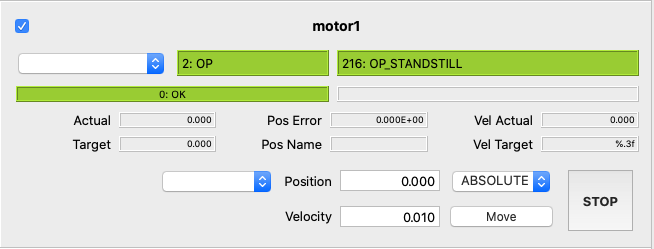
'cfg'a widget interface to configure the device. So far only for motor in v0.6.
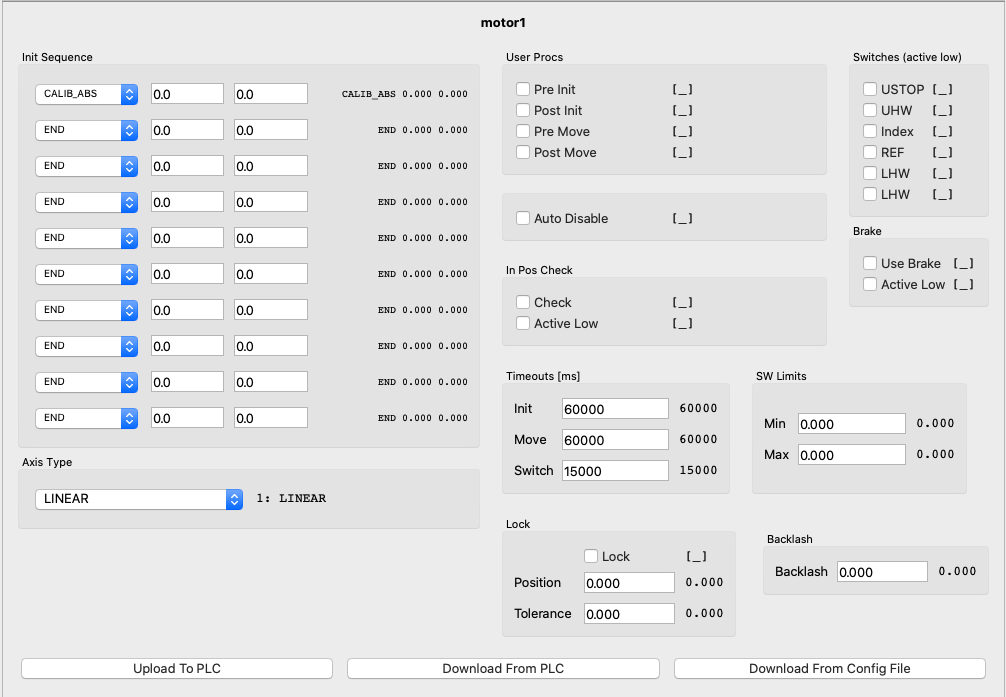
To create a device widget one can use the pydevmgr_core_qt.get_widget_factory() or directly the proper class
to build it and than connect it to a device and a pydevmgr_core.Downloader
from pydevmgr_elt_qt import MotorCtrl
from pydevmgr_elt import Motor, Downloader

motor1 = Motor('motor1', address='opc.tcp://192.168.1.28:4840', prefix='MAIN.Motor1', namespace=4)
downloader = Downloader()
motor_ctrl = MotorCtrl() # create an empty widget
motor_ctrl.connect(downloader, motor1) # connect the widget to the downloader and the motor1 instance

with motor1:
    downloader.download() # This will update the widget with the new values it can be called in a timer
The connect method above does :
add all the necessary nodes to the
downloader. i.e., The ones used by the widgetadd the widget
pydevmgr_elt_qt.MotorCtrl.update()method to thedownloadercall back queue: widget is updated after each downloadupdate the widget (e.g. position names in drop-down menus, etc) and link buttons to device methods.
The pydevmgr_elt_qt.MotorCtrl.disconnect() does the contrary, it free the nodes and callbacks from the downloader
and remove buttons action, used when the widget is destroyed for instance.
Optionally the pydevmgr_elt_qt.MotorCtrl.disconnect() returns a object used to enable and disable the widget
temporally :
c = motor_ctrl.connect(downloader, motor1)

c.diable() # diable the widget and suspend the nodes download associated to this widget
c.enable() # reconnect the widget.
Also one can have access to the data used by the widget in the c.data attribute.
Here is a complete script to make a window GUI to control two motors :
from pydevmgr_elt_qt import get_widget_factory
from pydevmgr_elt import Motor, Downloader
from PyQt5 import QtWidgets, QtCore
from PyQt5.QtWidgets import QApplication, QMainWindow
import sys


def main_gui(motor1, motor2):
    downloader = Downloader()

    app = QApplication(sys.argv)
    win = QtWidgets.QWidget()
    layout =  QtWidgets.QVBoxLayout(win)

    motor1_wl = get_widget_factory("ctrl", motor1.config.type).build()
    motor1_wl.connect(downloader, motor1)
    layout.addWidget(motor1_wl.widget)

    motor2_wl = get_widget_factory("ctrl", motor2.config.type).build()
    motor2_wl.connect(downloader, motor2)
    layout.addWidget(motor2_wl.widget)

    win.show()
    timer = QtCore.QTimer()
    timer.timeout.connect(downloader.download)
    timer.start(100)

    sys.exit(app.exec_())

if __name__ == '__main__':

    motor1 = Motor('motor1', address='opc.tcp://192.168.1.11:4840', prefix='MAIN.Motor1')
    motor2 = Motor('motor2', address='opc.tcp://192.168.1.11:4840', prefix='MAIN.Motor2')

    with motor1, motor2:
        main_gui(motor1, motor2)
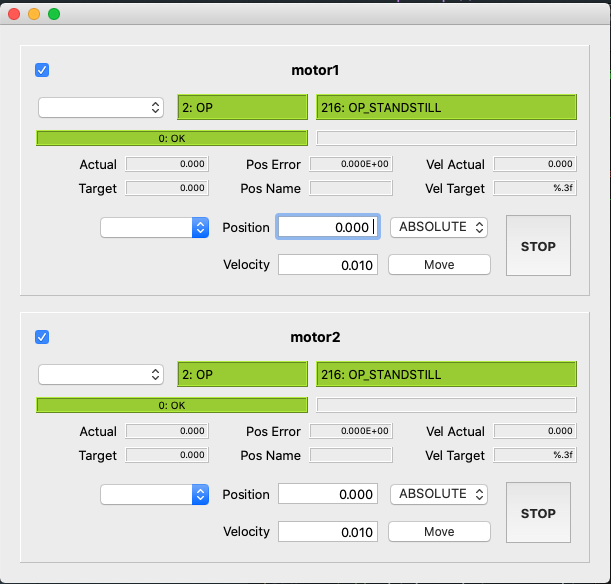
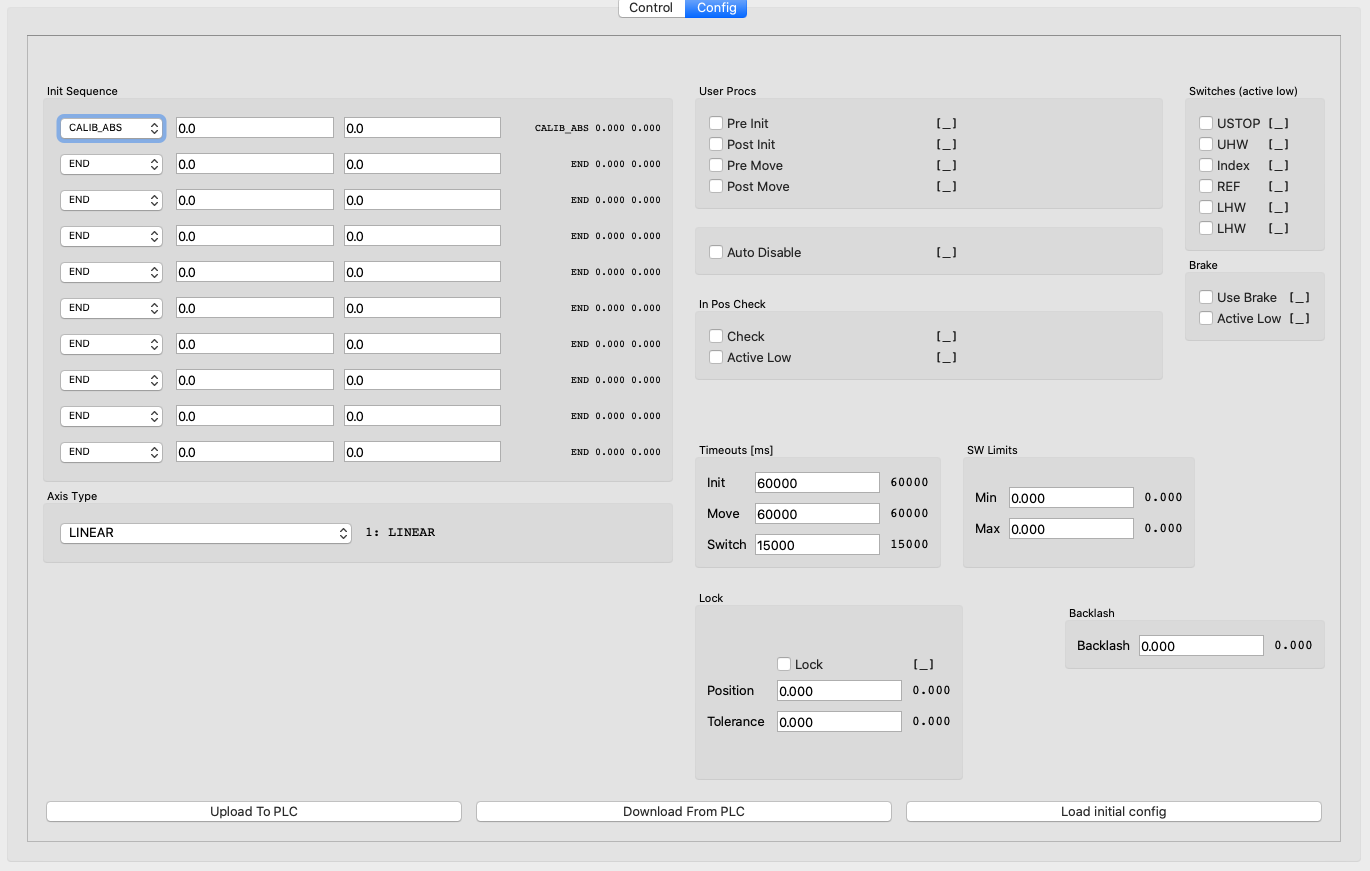
Motor GUI
A gui for motor control and config is avaiable from a shell command
> pydevmgr_motor_gui tins/motor1.yml
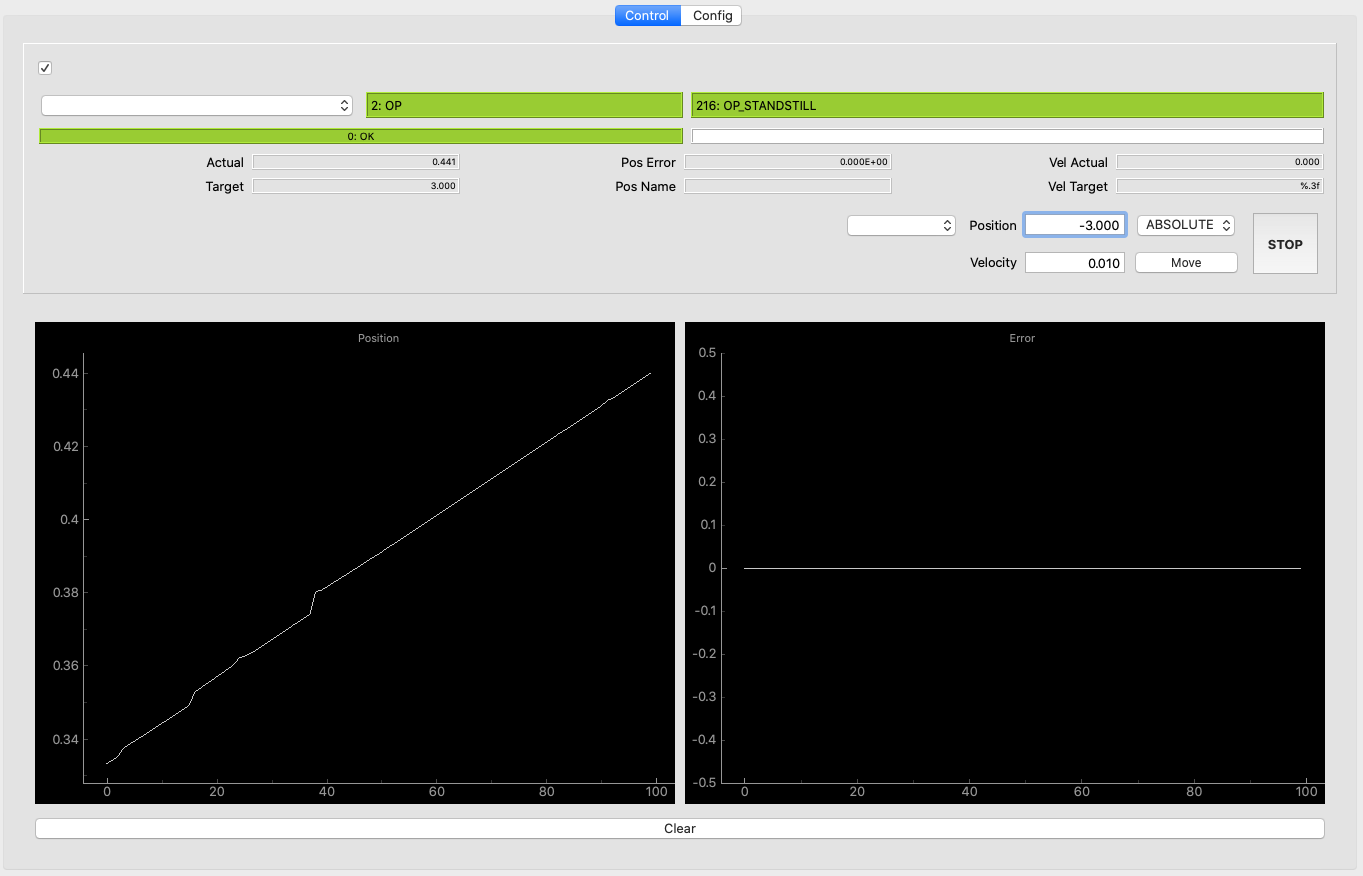
Manager GUI
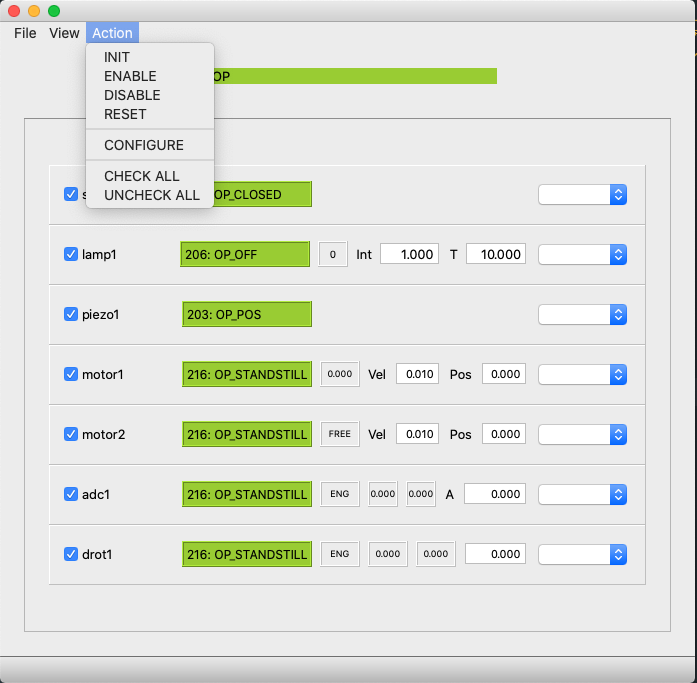
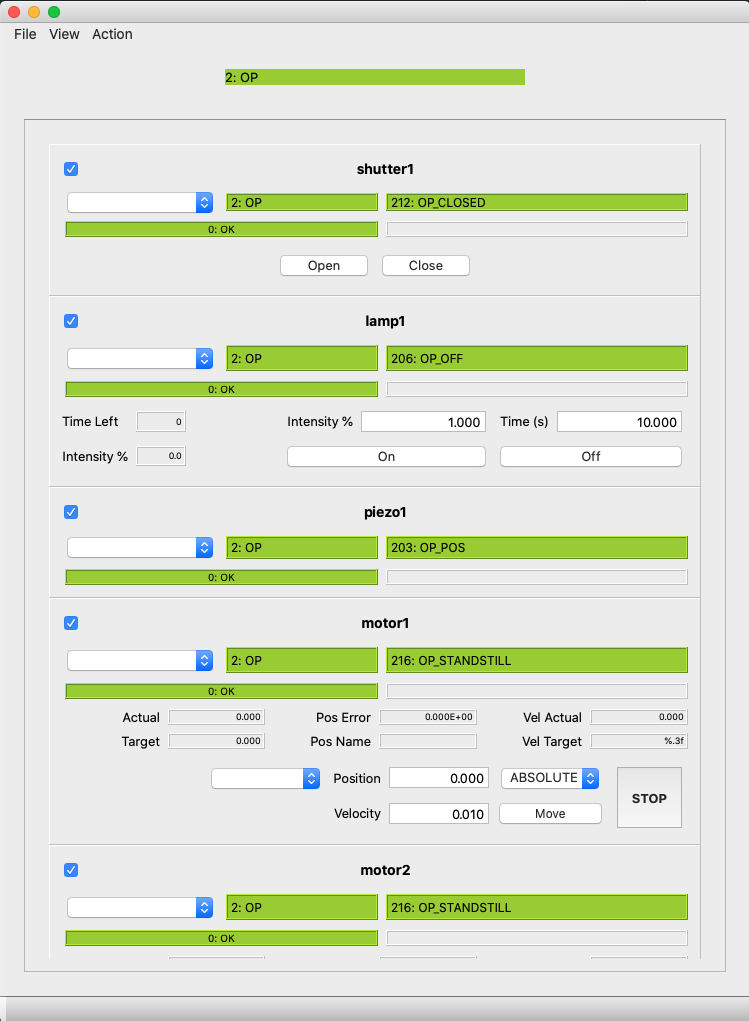
An automatic gui can be created easily with the pydevmgr_gui shell command :
> pydevmgr_gui tins/tins.yml
A definition of the gui “views” or layouts can be done in a yml file (with suffix _ui.yml) and a ui file.
The yml define which device or type of device shall be included in layouts named in the ui file. For instance
if the .ui file has a QVBoxLayout named ly_devices the manager suffixed _ui.yml file can declare what to add in this layout:
views:
    ctrl: # name of the "view"
        ui_file: simple_devices_frame.ui  # shall be in resources
        setup: # a list of rules defined inside a dictionary
            - device: "*"   # all devices
              layout: ly_devices
              widget_kind: "ctrl"

    motor1:
        size: [1200,500]
        setup:
            - device: motor1
              widget_kind: "ctrl"
            - device: motor1
              widget_kind: "cfg"
For the tins this open a gui with several views. The view are defined in the tins_ui.yml file.
The best way to understand how the layout of the widget is done is to look at the screenshot bellow and have a look at tins_extra.yml file which I think is self explanatory.
If no _ui.yml file was generated you will get a default gui which includes 2 views. One with all ‘line’ widget
and the other one with ‘ctrl’ widgets
Auto generated Indexes
Base on pydevmgr_ua, pydevmgr_elt is defining nodes and methods of ELT standard devices
All the pydevmgr_core and pydevmgr_ua module members are also included in this package
Example:
from pydevmgr_elt import Motor, wait, download

motor = Motor( address="opc.tcp://myplc.local:4840", prefix="MAIN.Motor1")
try:
    motor.connect()
    wait( motor.move_abs(2.3, 0.5) )
    print( *download( motor.stat.pos_actual, motor.stat.pos_error))
finally:
    motor.disconnect()
- class Adc(*args, fits_key: str = '', **kwargs)[source]
ELt Standard Adc device
- class AXIS(value)
AXIS enumeration has defined inside the PLC
- Cfg
alias of
AdcCfg
- class MODE(value)
The three ADC modes
- Rpcs
alias of
AdcRpcs
- Stat
alias of
AdcStat
- get_configuration(exclude_unset=True, **kwargs) Dict[EltNode, Any][source]
return a node/value pair dictionary ready to be uploaded
The node/value dictionary represent the device configuration. This is directly use by
Device.configure()method.- Parameters:
exclude_unset (optional, bool) – Default is True. If True value that was left unset in the config will not be included in the configuration
**kwargs – name/value pairs pointing to self.cfg.<name> node This allow to change configuration on the fly without changing the config file.
Exemples
>>> upload( {**motor1.get_configuration(), **motor2.get_configuration()} )
- init() EltNode[source]
init the device
- Raises:
RpcError – if OPC-UA Rpc method returns an error code
- Returns:
the
NodeAlias.stat.is_ready to check if the init is finished- Return type:
is_ready
Example
wait( device.init() )
- move_abs(axis, pos, vel) EltNode[source]
Move one or all motor to an absolute position
- Parameters:
- Returns:
the
NodeAliasself.stat.is_standstill to check if the device is in standstill- Return type:
is_standstill (Node)
Example
wait( adc.move_abs( adc.AXIS.AXIS1, 34.5, 4.0 ) )
- move_angle(angle=0.0) EltNode[source]
Move to angle (OFF mode)
- Parameters:
angle (float, optional) – target angle default = 0.0
- Returns:
- the
NodeAlias.stat.is_standstill to check if the device is in standstill. (e.i. movement finished)
- the
- Return type:
is_standstill (Node)
Example
wait( adc.move_angle( 34.3 ) )
- move_rel(axis, pos, vel) EltNode[source]
Move one or all motor to an relative position
- Parameters:
- Returns:
the
NodeAlias.stat.is_standstill to check if the device is in standstill- Return type:
is_standstill (Node)
Example
wait( adc.move_rel( adc.AXIS.AXIS1, 8.5, 4.0 ) )
- class CcsSim(*args, fits_key: str = '', **kwargs)[source]
ELt Standard CcsSim device as in IFW v3.0 (this may change)
- Cfg
alias of
CcsSimCfg
- Rpcs
alias of
CcsSimRpcs
- Stat
alias of
CcsSimStat
- get_configuration(exclude_unset=True, **kwargs) dict[source]
return a node/value pair dictionary ready to be uploaded
The node/value dictionary represent the device configuration. This is directly use by
Device.configure()method.- Parameters:
exclude_unset (optional, bool) – Default is True. If True value that was left unset in the config will not be included in the configuration
**kwargs – name/value pairs pointing to self.cfg.<name> node This allow to change configuration on the fly without changing the config file.
Exemples
>>> upload( {**motor1.get_configuration(), **motor2.get_configuration()} )
- set_coordinates(ra: float, dec: float, equinox: float = 2000.0) None[source]
Set coordinates in CcsSim
- set_environment(temperature: Optional[float] = None, pressure: Optional[float] = None, humidity: Optional[float] = None, lapserate: Optional[float] = None, wavelength: Optional[float] = None, dut: Optional[float] = None)[source]
set environmnent data to the Ccs Simulator
Each settings arguments are potionals: temperature, pressure, humidity, lapserate, wavelength, dut.
They are taken into account if not None
- class DataLink(input: Any, model: BaseModel, strick_match: bool = True)[source]
Link an object containing nodes, to a
pydantic.BaseModel- Parameters:
input (Any) – Any object with attributes, expecting that the input contains some
BaseNodeattributes in its hierarchymodel (
pydantic.BaseModel) – a data model. Is expecting that the data model structure containsNodeVartype hint signature.
Example
In the following, it is assumed that the motor1 object has a .stat attribute and the .stat object have nodes as pos_actual, vel_actual, etc …
from pydevmgr_core import NodeVar, DataLink
from pydevmgr_core.nodes import UtcTime
from pydantic import BaseModel, Field

class MotorStatData(BaseModel):
    # the following nodes will be retrieve from the input object, the name here is the
    # the attribute of the input object
    pos_actual:  NodeVar[float] = 0.0
    vel_actual:  NodeVar[float] = 0.0


    # also the input object attribute pointing to a node can be changed
    # with the no de keyword in Field (from pydantic import Field)
    pos: NodeVar[float] = Field(0.0, node='pos_actual')
    vel: NodeVar[float] = Field(0.0, node='vel_actual')


class MotorData(BaseModel):
    num  : int =1 # other data which are not node related

    # Add the stat Data Model
    stat : MotorStatData = MotorStatData()

    # This node is standalone, not linked to input object,
    # it must be specified in Field with the node keyword
    utc:         NodeVar[str]   = Field('1950-01-01T00:00:00.00000', node=UtcTime('utc'))


>>> data = MotorData()
>>> data.stat.pos
0.0
>>> link = DataLink( motor1, data )
>>> link.download() # download node values inside data from tins.motor1
>>> data.stat.pos
4.566
>>> data.utc
'2020-12-17T10:05:15.831726'
DataLinkcan be added to aDownloader, at init or with theDwonloader.add_datalink()methodfrom pydevmgr_core import Downloader >>> downloader = Downloader(link) >>> downloader.download() # Or >>> connection = downloader.new_connection() >>> connection.add_datalink(link)
- class Downloader(nodes_or_datalink: Optional[Union[Iterable, BaseDataLink]] = None, data: Optional[Dict] = None, callback: Optional[Callable] = None, trigger: Optional[Callable] = None)[source]
object dedicated to download nodes, feed data and run some callback
An application can request nodes to be downloaded and callback to be executed after each success download or each failures.
- Parameters:
nodes_or_datalink (iterable of node or
DataLink) –An initial, always downloaded, list of nodes
Or a
DataLinkobject
data (dict, optional) – A dictionary to store the data. If not given, one is created and accessible through the .data attribute. This data is made of node/value pairs, the .get_data_view gives however a dictionary like object with string/value pairs. Each time a new node is added to the downloader it will be added to the data as
data[node] = None. None will be replaced after the next download.callback (callable, optional) – one single function with signature f(), if given always called after successful download.
trigger (callable, optional) – a function taking no argument and should return True or False If given the “download” method download nodes only if f() return True. Can be used if the download object is running in a thread for instance.
Example
A dumy exemple, replace the print_pos by a GUI interface for instance:
def print_pos(m, data):
    "An application"
    print("Position :",  data[m.stat.pos_actual], data[m.stat.pos_error] )

>>> tins = open_manager('tins/tins.yml')
>>> tins.connect()
>>> downloader = Downloader()
>>> token = downloader.new_token()
>>> downloader.add_node(token, tins.motor1.stat.pos_actual, tins.motor1.stat.pos_error )
>>> downloader.add_callback(token, lambda : print_pos(tins.motor1, downloader.data))
>>> downloader.download()
Position : 3.45 0.003
>>> downloader.data
{
<UaNode key='motor1.pos_error'>: 0.003,
<UaNode key='motor1.pos_actual'>:  3.45
}

>>> downloader.disconnect(token) # disconnect the print_pos function and remove
                                 # the pos_actual, pos_error node from the list of nodes
                                 # to download (except if an other connection use it)
Same result can be obtained with this exemple:
def print_pos(data):
    "An application"
    print("Position :",  data['pos_actual'], data['pos_error'] )

>>> nodes_data = {tins.motor1.stat.pos_actual: -9.99 , tins.motor1.stat.pos_error: -9.99}
>>> m1_data = DataView(nodes_data, tins.motor1.stat)
>>> downloader = Downloader(nodes_data, callback=lambda: print_pos(m1_data))
>>> downloader.download()
Position : 3.45 0.003
>>> m1_data
{'pos_error': 0.003, 'pos_actual': 3.45}
- Connection
alias of
DownloaderConnection
- exception StopDownloader
- add_callback(token: tuple, *callbacks) None[source]
Register callbacks to be executed after each download
The callback must have the signature f(), no arguments.
- Parameters:
token – a Token returned by
Downloader.new_connection()*callbacks – callbacks to be added to the queue of callbacks, associated to the app
- add_datalink(token: tuple, *datalinks) None[source]
Register a new datalink
- Parameters:
token – a Token returned by
Downloader.new_token()add_datalink(...,dl1, dl2)can also be used, in this case they will be added to the main pool of datalinks and cannot be remove from the downloader*datalinks –
DataLinkto be added to the download queue, associated to the token
- add_failure_callback(token: tuple, *callbacks) None[source]
Add one or several callbacks to be executed when a download failed
When ever occur a failure (Exception during download)
f(e)is called withethe exception. If a download is successfull after a failuref(None)is called one time only.- Parameters:
token – a Token returned by
Downloader.new_token()*callbacks – callbacks to be added to the queue of failure callbacks, associated to the app
- add_node(token: tuple, *nodes) None[source]
Register node to be downloaded for an iddentified app
- Parameters:
token – a Token returned by
Downloader.new_token()add_node(...,node1, node2)can also be used, in this case nodes will be added to the main pool of nodes and cannot be removed from the downloader*nodes – nodes to be added to the download queue, associated to the app
- add_nodes(token: tuple, nodes: Iterable) None[source]
Register nodes to be downloaded for an iddentified app
- Parameters:
token – a Token returned by
Downloader.new_token()add_node(...,node1, node2)can also be used, in this case nodes will be added to the main pool of nodes and cannot be removed from the downloadernodes (Iterable, dict) – nodes to be added to the download queue, associated to the app If a dictionary of node/value pairs, they are added to the downloader data.
- clean_data() None[source]
Remove to the .data dictionary all keys/value pairs corresponding to nodes not in the downloader queue
- Returns:
The number of node/value pair removed
- Return type:
n (int)
- disconnect(token: tuple) None[source]
Disconnect the iddentified connection
All the nodes used by the connection (and not by other connected app) will be removed from the download queue of nodes. Also all callback associated with this connection will be removed from the downloader
Note that the discnnected nodes will stay inside the downloader data but will not be updated
- Parameters:
token – a Token returned by
Downloader.new_token()
- download() None[source]
Execute a download
Each nodes on the queue are fetched and the .data dictionary is updated from new values.
If the Downloader has a trigger method and the trigger return false, nothing is done
- get_data_view(prefix: str = '') DataView[source]
Return a view of the data in a dictionary where keys are string keys extracted from nodes
If prefix is given the return object will be limited to items with key matching the prefix.
Note: the data view reflect any change made on the rootdata except when new nodes (mathing the prefix) are added. So all necessary nodes shall be added to the downloader before requesting a DataView.
- Parameters:
prefix (str, optional) – limit the data viewer to a given prefix. prefix can also be an object with the key attribute like a
BaseDevice,BaseNodeetc …
Example
> downloader = Downloader([mgr.motor1.substate, mgr.motor1.pos_actual, mgr.motor2.substate])
> downloader.download()
> m1_data = downloader.get_data_view(mgr.motor1.key)
> m1_data['pos_actual']
3.9898
> m1_data = downloader.get_data_view(mgr.motor1)
# is equivalent to
> m1_data = DataView(downloader.data, mgr.motor1)
- new_connection()[source]
Return a
DownloaderConnectionobjectThe
DownloaderConnectionobject contain a token and the downloader in order to have a standalone object to handle the add/remove of queue nodes and callbacks
- new_token() tuple[source]
add a new app connection token
- Returns:
- A token, the token and type itself is not relevant, it is just a unique ID to be used in
add_node, add_callback, add_failure_callback, and disconnect methods
Note
- new_connection() method return object containing a pair of token and downloader and all
methods necessary to add_nodes, add_callbacks, etc …
- remove_callback(token: tuple, *callbacks) None[source]
Remove callbacks
If the callback is not in the queueu nothing is done or raised
- Parameters:
token – a Token returned by
Downloader.new_token()*callbacks – callbacks to be removed
- remove_datalink(token: tuple, *datalinks) None[source]
Remove a datalink from a established connection
If the datalink is not in the queueu nothing is done or raised
- Parameters:
token – a Token returned by
Downloader.new_token()*datalinks –
DataLinkobjects to be removed
- remove_failure_callback(token: tuple, *callbacks) None[source]
remove one or several failure callbacks
If the callback is not in the queue nothing is done or raised
- Parameters:
token – a Token returned by
Downloader.new_token()*callbacks – callbacks to be removed
- remove_node(token: tuple, *nodes) None[source]
Remove node from the download queue
if the node is not in the queueu nothing is done or raised
Note that the node will stay inside the downloader data but will not be updated
- Parameters:
token – a Token returned by
Downloader.new_token()*nodes – nodes to be removed
- run(period: float = 1.0, stop_signal: ~typing.Callable = <function Downloader.<lambda>>, sleepfunc: ~typing.Callable = <built-in function sleep>) None[source]
run the download indefinitely or when stop_signal return True
- Parameters:
period (float, optional) – period between downloads in second
stop_signal (callable, optional) – a function returning True to stop the loop or False to continue
- runner(period: float = 1.0, stop_signal: ~typing.Callable = <function Downloader.<lambda>>, sleepfunc: ~typing.Callable = <built-in function sleep>) Callable[source]
Create a function to run the download in a loop
Usefull to define a Thread for instance
- Parameters:
period (float, optional) – period between downloads in second
stop_signal (callable, optional) – a function returning True to stop the loop or False to continue
Example
>>> downloader = Downloader([mgr.motor1.substate, mgr.motor1.pos_actual])
>>> t = Thread( target = downloader.runner(period=0.1) )
>>> t.start()
- class Drot(*args, fits_key: str = '', **kwargs)[source]
ELt Standard Drot device
- Cfg
alias of
DrotCfg
- class MODE(value)
An enumeration.
- Rpcs
alias of
DrotRpcs
- Stat
alias of
DrotStat
- init()[source]
init the device
- Raises:
RpcError – if OPC-UA Rpc method returns an error code
- Returns:
the
NodeAlias.stat.is_ready to check if the init is finished- Return type:
is_ready
Example
wait( device.init() )
- move_angle(angle=0.0) EltNode[source]
Move drot to angle in STAT mode
- Parameters:
angle (float, optional) – target angle default = 0.0
- Returns:
- the
NodeAlias.stat.is_standstill to check if the device is in standstill. (e.i. movement finished)
- the
- Return type:
is_standstill
Example
wait( drot.move_angle( 34.3 ) )
- class EltManager(key: Optional[str] = None, config: Optional[Union[ManagerConfig, ManagerIOConfig, Dict]] = None, devices: Optional[Union[Dict[str, Config], Dict[str, EltDevice]]] = None, **kwargs)[source]
UaManager object, handling several devices
Note
Most likely the UaManager will be initialized by
UaManager.from_cfgfile()or its aliasopen_elt_manager()- Parameters:
key (str, optional) – the key (prefix of all devices) of the manager If None key is the ‘server_id’ defined inside the config dictionary or a random one is generated
config (dict,
ManagerConfig,ManagerIOConfig) – tion for the managerdevices (dict, optional) –
- name/
UaDevicepairs or name/
DeviceConfigpairs
- name/
Used when the manager is built without configuration file
Exemples:
from pydevmgr_elt import EltManager, Motor, Lamp

devices = dict(
    motor = Motor('motor', address="opc.tcp://localhost:4840", prefix="MAIN.Motor1" ),
    lamp = Lamp( 'lamp', address="opc.tcp://localhost:4840", prefix="MAIN.Lamp1"  )
)
mgr = EltManager('mgr',  devices )

mgr.connect()
mgr.motor.stat.pos_actual.get()
# etc ...
Or one can subclass the EltManager to configure the device layout configuration in the class
from pydevmgr_elt import EltManager, Motor, Lamp, Defaults, wait

class AitBench(EltManager):
   class Config( EltManager.Config, extra="forbid" ):
       motor: Defaults[Motor.Config] = Motor.Config( address="opc.tcp://myplc.local:4840", prefix="MAIN.Motor1" )
       lamp: Defaults[Lamp.Config] = Lamp.Config( address="opc.tcp://myplc.local:4840", prefix="MAIN.Lamp1" )
       server =  EltManager.Config.Server( devices=['motor', 'lamp'] )


mgr = AitBench('mgr')
mgr.connect()
wait( mgr.init() )
# etc ...
Above the devices list is the list of device names used in any function of mgr (like connect, init, reset etc…). For compatibility with ESO config file this device` parameter is inside a
serverstructure (pydandic model). This is not convenient but you can do whatever you want in your Config file and add the devices property of your class.from pydevmgr_elt import EltManager, Motor, Lamp, CcsSim, Defaults, wait, BaseManager from typing import List class AitBench(EltManager): class Config( BaseManager.Config, extra="forbid" ): motor: Defaults[Motor.Config] = Motor.Config( address="opc.tcp://myplc.local:4840", prefix="MAIN.Motor1" ) lamp: Defaults[Lamp.Config] = Lamp.Config( address="opc.tcp://myplc.local:4840", prefix="MAIN.Lamp1" ) ccs: CcsSim.Config = CcsSim.Config(address="opc.tcp://myplc.local:4840", prefix="MAIN.ccs_sim") devices: List[str] = ['lamp', 'motor'] @property def devices(self): return [getattr(self, name) for name in self.config.devices] mgr = AitBench('mgr') mgr.devices
Note, above I have added a ccs to show that even if it is not part of the devices list (used in connect, init, reset, enable, disable function) the ccs is still part of the manager :
mgr.ccs.set_coordinates( 044534.0, -244567.0, 2000 )
- Config
alias of
Config
- StatInterface
alias of
ManagerStatInterface
- disable() NodeAlias[source]
Disable all child devices
devices with a ignored flag will be ignored
- Returns:
- a
NodeAliaswhich result in True when all devices are disabled can be used in the
pydevmgr.wait()function
- a
- Return type:
all_disabled
Example
wait( mgr.disable_all() )
- enable() NodeAlias[source]
Enable all child devices
devices with a ignored flag will be ignored
- Returns:
- a
NodeAliaswhich result in True when all devices are enabled can be used in the
pydevmgr.wait()function
- a
- Return type:
all_enabled
Example
wait( mgr.enable() )
- classmethod from_cfgfile(cfgfile, path='', prefix: str = '', key=None)[source]
Create the object from a configuration file
- Parameters:
cfgfile (str) – Path to the config file, shall be relative to one of the $CFGPATH or absolute path
key (str, Optional) – key of the device, if not given this is built from the path suffix and the optional prefix
path (None, str, False) – for instance ‘a.b.c’ will loock at cfg[‘a’][‘b’][‘c’] from the loaded config file If “” the config file define the device configuration from its root If None the first item of the config file is taken. Note that the path can be defined directly inside the cfgfile file name in the form
path/to/myconfig.yml[a.b.c]seeload_config()prefix (str, optional) – add a prefix to the path name to build the device key. It is used only if key is None otherwhise ignored
- get_device(name: str) EltDevice[source]
get device matching the name Raise ValueError if not found :param name: device name :type name: str
- init() NodeAlias[source]
Init all child devices
devices with a ignored flag will be ignored
- Returns:
- a
NodeAliaswhich result in True when all devices are initialised can be used in the
pydevmgr.wait()function
- a
- Return type:
all_initialised
Example
wait( mgr.init() )
- class EltRpc(key: Optional[str] = None, config: Optional[UaRpcConfig] = None, *, com: Optional[Union[dict, UaCom, Client]] = None, **kwargs)[source]
- class RPC_ERROR(value)
An enumeration.
- class GROUP[source]
Constants holder GROUP are used to classify state and substates
This class is not intended to be instancied but only to hold constants
An application if for widget styling for instance : one style per group
- class Lamp(*args, fits_key: str = '', **kwargs)[source]
ELt Standard Lamp device
- Cfg
alias of
LampCfg
- Rpcs
alias of
LampRpcs
- Stat
alias of
LampStat
- class Motor(*args, fits_key: str = '', **kwargs)[source]
ELt Standard Motor device
- Cfg
alias of
MotorCfg
- Rpcs
alias of
MotorRpcs
- Stat
alias of
MotorStat
- get_configuration(exclude_unset=True, **kwargs) Dict[EltNode, Any][source]
return a node/value pair dictionary ready to be uploaded
The node/value dictionary represent the device configuration.
- Parameters:
**kwargs – name/value pairs pointing to cfg.name node This allow to change configuration on the fly without changing the config file.
- get_name_of_pos(pos_actual: float) str[source]
Retrun the name of a position from a position as input or ‘’
Example
m.get_name_of( m.stat.pos_actual.get() )
- get_pos_target_of_name(name: str) float[source]
return the configured target position of a given pos name or raise error
- is_near(pos: float, tol: float, data: Optional[Dict[str, Any]] = None) bool[source]
-> True when abs(pos_actual-pos)<tol
- move_abs(absPos, vel=None) EltNode[source]
move motor to an absolute position
self.move_abs(pos, vel) <-> self.rpc.rpcMoveAbs(pos, vel)
- class NodeAlias(key: Optional[str] = None, nodes: Optional[Union[BaseNode, List[BaseNode]]] = None, config: Optional[Config] = None, **kwargs)[source]
NodeAlias mimic a real client Node.
The NodeAlias object does a little bit of computation to return a value with its get() method and thanks to required input nodes.
The NodeAlias cannot be use as such without implementing a fget method. This can be done by implementing the fget method on an inerated class or with the nodealias decorator.
NodeAlias is an abstraction layer, it does not do anything complex but allows uniformity among ways to retrieve values.
NodeAlias object can be easely created with the @nodealias() decorator
..note:
:class:`pydevmgr_core.NodeAlias` can accept one or several input node from the unique ``nodes`` argument.
To remove any embiguity NodeAlias1 is iddentical but use only one node as input from the ``node`` argument.
- Parameters:
key (str) – Key of the node
(list (nodes) – BaseNode): list of nodes necessary for the alias node. When the node alias is used in a
pydevmgr_core.Downloaderobject, the Downloader will automaticaly fetch those required nodes from server (or other node aliases).class – BaseNode): list of nodes necessary for the alias node. When the node alias is used in a
pydevmgr_core.Downloaderobject, the Downloader will automaticaly fetch those required nodes from server (or other node aliases).
Example:
Using a dummy node as imput (for illustration purpose).
from pydevmgr_core.nodes import Value
from pydevmgr_core import NodeAlias
position = Value('position', value=10.3)

is_in_position = NodeAlias( nodes=[position])
is_in_position.fget =  lambda pos: abs(pos-4.56)<0.1
is_in_position.get()
# False
Using the nodealias decorator
from pydevmgr_core.nodes import Value
from pydevmgr_core import NodeAlias
position = Value('position', value=10.3)

@nodealias('is_in_position')
def is_in_position(pos):
    return abs(pos-4.56)<0.1
Derive the NodeAlias Class and add target position and precision in configuration
from pydevmgr_core.nodes import Value
from pydevmgr_core import NodeAlias
position = Value('position', value=10.3)


class InPosition(NodeAlias):
    class Config(NodeAlias.Config):
        target_position: float = 0.0
        precision : float = 1.0

    def fget(self, position):
        return abs( position - self.config.target_position) < self.config.precision

is_in_position = InPosition('is_in_position', nodes=[position],  target_position=4.56, precision=0.1)

is_in_position.get()
# False
position.set(4.59)
is_in_position.get()
# True
NodeAlias can accept several nodes as input:
from pydevmgr_core.nodes import Value
from pydevmgr_core import NodeAlias

class InsideCircle(NodeAlias):
    class Config(NodeAlias.Config):
        x: float = 0.0
        y: float = 0.0
        radius: float = 1.0

    def fget(self, x, y):
        return  ( (x-self.config.x)**2 + (y-self.config.y)**2 ) < self.config.radius**2

position_x = Value('position_x', value=2.3)
position_y = Value('position_y', value=1.4)
is_in_target = InsideCircle( 'is_in_target', nodes=[position_x, position_y], x=2.0, y=1.0, radius=0.5 )
is_in_target.get()
# True
See also
nodealias()NodeAlias1- Config
alias of
Config
- Property
alias of
NodeAliasProperty
- classmethod new(parent, name, nodes=None, config=None, **kwargs)[source]
a base constructor for a NodeAlias within a parent context
- The requirement for the parent :
a .key attribute
attribute of the given name in the list shall return a node
- classmethod prop(name: Optional[str] = None, nodes=None, **kwargs)[source]
Return an object property to be defined in a class
Exemple:
- ::
from pydevmgr_core import BaseDevice from pydevmgr_core.nodes import Static
- def MyDevice(BaseDevice):
ref_temperature = Static.prop(value=22.0)
MyDevice().ref_temperature.get()
- class NodeVar(*args, **kwds)[source]
A Field as NodeVar. Does not do validation by itself but it is used as an iddentifier of a node value
- class Piezo(*args, fits_key: str = '', **kwargs)[source]
ELt Standard Piezo device
- Cfg
alias of
PiezoCfg
- Rpcs
alias of
PiezoRpcs
- Stat
alias of
PiezoStat
- exception RpcError[source]
Raised when an rpc method is returning somethingelse than 0
See rcall method of RpcNode
- class Sensor(*args, fits_key: str = '', **kwargs)[source]
ELt Standard Sensor device
- class AiChannel(key: Optional[str] = None, node: Optional[BaseNode] = None, config: Optional[Config] = None, localdata: Optional[dict] = None, **kwargs)
NodeAlias1 to a analog input node iddentified from a number
- Config:
channel_number (int)
Example:
from pydevmgr_elt import Sensor


class MySensor(Sensor):
    class Config(Sensor.Config):
        temperature  = Sensor.AiChannel.Config(channel_number=3)

my_sensor = MySensor()
assert my_sensor.temperature.get() == my_sensor.aiChannels.ai3.get()
- Config
alias of
Config
- class AoChannel(key: Optional[str] = None, node: Optional[BaseNode] = None, config: Optional[Config] = None, localdata: Optional[dict] = None, **kwargs)
NodeAlias1 to a analog output node iddentified from a number
- Config:
channel_number (int)
Example:
from pydevmgr_elt import Sensor


class MySensor(Sensor):
    class Config(Sensor.Config):
        intensity  = Sensor.AoChannel.Config(channel_number=3)

my_sensor = MySensor()
# then
my_sensor.intensity.set(45)
# is iddentical to
my_sensor.aoChannels.ao3.set(45)
- Config
alias of
Config
- Cfg
alias of
SensorCfg
- class DiChannel(key: Optional[str] = None, node: Optional[BaseNode] = None, config: Optional[Config] = None, localdata: Optional[dict] = None, **kwargs)
NodeAlias1 to a digital input node iddentified from a number
- Config:
channel_number (int)
Example:
from pydevmgr_elt import Sensor


class MySensor(Sensor):
    class Config(Sensor.Config):
        door_interlock = Sensor.DiChannel.Config(channel_number=3)
- Config
alias of
Config
- class DoChannel(key: Optional[str] = None, node: Optional[BaseNode] = None, config: Optional[Config] = None, localdata: Optional[dict] = None, **kwargs)
NodeAlias1 to a analog output node iddentified from a number
- Config:
channel_number (int)
Example:
from pydevmgr_elt import Sensor


class MySensor(Sensor):
    class Config(Sensor.Config):
        switch  = Sensor.DoChannel.Config(channel_number=3)

my_sensor = MySensor()
# then
my_sensor.witch.set(True)
# is iddentical to
my_sensor.doChannels.do3.set(True)
- Config
alias of
Config
- Rpcs
alias of
SensorRpcs
- Stat
alias of
SensorStat
- class Shutter(*args, fits_key: str = '', **kwargs)[source]
ELt Standard Shutter device
- Cfg
alias of
ShutterCfg
- Rpcs
alias of
ShutterRpcs
- Stat
alias of
ShutterStat
- close() EltNode[source]
close the shutter
- Returns:
the
NodeAlias.stat.is_closed to check if the shutter is closed- Return type:
is_closed
Example
wait( shutter.close() )
- class Time(*args, fits_key: str = '', **kwargs)[source]
ELt Standard Time device
- Cfg
alias of
TimeCfg
- class MODE(value)
An enumeration.
- Rpcs
alias of
TimeRpcs
- Stat
alias of
TimeStat
- disable() EltNode[source]
disable the device
- Raises:
RpcError – if OPC-UA Rpc method returns an error code
- Returns:
the
NodeAlias.stat.is_not_operational to check if device was disabled- Return type:
is_not_operational
wait( device.disable() )
- enable() EltNode[source]
enable the device
- Raises:
RpcError – if OPC-UA Rpc method returns an error code
- Returns
is_operational: the
NodeAlias.stat.is_operational to check if device was enabled
wait( device.enable() )
- init() EltNode[source]
init the device
- Raises:
RpcError – if OPC-UA Rpc method returns an error code
- Returns:
the
NodeAlias.stat.is_ready to check if the init is finished- Return type:
is_ready
Example
wait( device.init() )
- class UaDouble(config: Optional[ParserElementConfig] = None, **kwargs)[source]
Parser for Double Variant type
- class UaFloat(config: Optional[ParserElementConfig] = None, **kwargs)[source]
Parser for Float Variant type
- class UaInt16(config: Optional[ParserElementConfig] = None, **kwargs)[source]
Parser for Int16 Variant type
- class UaInt32(config: Optional[ParserElementConfig] = None, **kwargs)[source]
parser for Int32 Variant type
- class UaInt64(config: Optional[ParserElementConfig] = None, **kwargs)[source]
Parser for Int64 Variant type
- class UaUInt16(config: Optional[ParserElementConfig] = None, **kwargs)[source]
Parser for UInt16 Variant type
- class UaUInt32(config: Optional[ParserElementConfig] = None, **kwargs)[source]
parser for UInt32 Variant type
- class UaUInt64(config: Optional[ParserElementConfig] = None, **kwargs)[source]
Parser for UInt64 Variant type
- class Uploader(node_dict_or_datalink: Union[Dict[BaseNode, Any], BaseDataLink], callback: Optional[Callable] = None)[source]
An uploader object to upload data to the PLC
The values to upload is defined in a dictionary of node/value pairs.
Not sure their is a strong use case for this. Maybe if pydevmgr is used as server instead of client
- Parameters:
node_dict_or_datalink (dict,
DataLink) – Dictionary of node/value pairs like{ motor.cfg.velocity : 4.3 }Or apydevmgr_core.DataLinkobject.callback (callable, optional) – callback function after each upload
Example:
>>> values  = {mgr.motor1.velocity: 1.0, mgr.motor2.velocity: 2.0}
>>> uploader = Uploader(values)
>>> t = Thread(target=uploader.runner)
>>> t.start()
>>> uploader[mgr.motor1.velocity] = 1.4 # will be uploaded at next trhead cycle
from pydevmgr_elt import DataLink, NodeVar
from pydantic import BaseModel

class Config(BaseModel):
    backlash: NodeVar[float] = 0.0
    disable: NodeVar[bool] = False

>>> conf = Config()
>>> Uploader( DataLink(mgr.motor1.cfg, conf) ).upload()
See also
upload(): equivalent to Uploader(node_values).upload()- run(period: float = 1.0, stop_signal: ~typing.Callable = <function Uploader.<lambda>>, sleepfunc: ~typing.Callable = <built-in function sleep>) None[source]
Run the upload infinitly or until stop_signal is True
- Parameters:
period (float, optional) – period of each upload cycle
stop_signal (callable, optional) – A function called at each cycle, if True the loop is break and run returns
- runner(period: float = 1.0, stop_signal: ~typing.Callable = <function Uploader.<lambda>>, sleepfunc: ~typing.Callable = <built-in function sleep>) Callable[source]
return a function to updload
this is designed in particular to be used in a target Thread
- Parameters:
period (float, optional) – period of each upload cycle
stop_signal (callable, optional) – A function called at each cycle, if True the loop is break and run returns
Example
>>> values  = {mgr.motor1.velocity: 1.0, mgr.motor2.velocity: 2.0}
>>> uploader = Uploader(values)
>>> t = Thread(target=uploader.runner)
>>> t.start()
>>> values[mgr.motor1.velocity] = 1.2 # will be updated at next thread cycle
- class Waiter(node_or_func_list, logic='all_true', period=0.1, timeout=60, stop_signal=<function Waiter.<lambda>>, stop_function=<function Waiter.<lambda>>, data=None, lag=0.0)[source]
Object use to wait for some condition to be True
The only method of this object is
Waiter.wait()- Parameters:
node_or_func_list (iterable) – an iterable of nodes or callable. Or a single node waiter.wait will wait until all node.get and callable return True (by default)
logic (string, optional) – “all_true” : stop waiting when all check function return True (default) “all_false” : stop waiting when all check function return False “any_true” : stop waiting when one of the check function return True “any_false” : stop waiting when one of the check function return False
period – float, optional default is 0.1 second the sleep time in second in between checks
timeout – float, optional second, default is 60 if time since the call of the function exceed timeout an ValueError is raised. timeout is in second as well
stop_signal (callable, optional) –
A callable object returning True to stop the wait. A stop signal will execute an optional stop_function and then raise a RuntimeError The example bellow is equivalent to setting a timeout. However timeout argument is kept for compatibility reason
from pydevmgr_core.signals import Timeout
from pydevmgr_core import wait
wait( [... som stuff...], stop_signal=Timeout(60.0) )
stop_function (callable, optional) – A callable to be executed in case of stop_signal
data (None, dict, optional) – If given input nodes values are taken from the data dictionary which is expected to be updated in someother place.
lag (float) – lag is a time in second corresponding to a sleep time before starting the wait process This can be usefull to make sure that an action as started on the server before checking the nodes
Example:
>>> wait_moving = Waiter([motor.stat.is_moving])
>>> wait_moving.wait()
wait return True and can be used as a trigger for a
Downloadobject :>>> data = {} >>> pos_update = Downloader(data, [motor.stat.pos_actual], triger=wait_moving.wait) >>> t = Thread(target=pos_update.runner(0.5)) >>> t.start()
In the exemple above the thread will update the data dictionary every 0.5 seconds with motor position only when the motor is moving.
- timeout
timeout in second, a RuntimeError is raised if conditions are still false after timeout.
- Type:
- download(nodes, data: Optional[Dict] = None) Optional[list][source]
read node values from remote servers in one call per server
- Parameters:
nodes (iterable) – Iterable of nodes, like [mgr.motor1.stat.pos_actual, mgr.motor2.stat.pos_actual]
data (dict, optional) – This is mostlikely a dictionary, must define a __setitem__ method If given the function return None and update data in place. If data is None the function return a list of values
- Returns:
- download(nodes) -> return list of values
download(nodes, data) -> return None and update the input data dictionary
- Return type:
None, or list
Example:
data = {n:n.get() for n in nodes}
Is equivalent, but much slower than
data = {}
download(nodes)
The latest is more efficient because only one call (per server) is done.
data dictionary is optional, if not given values are returned in a list:
pos, error = download([mgr.motor1.stat.pos_actual, mgr.motor1.stat.pos_error])
- nodealias(key: Optional[str] = None, nodes: Optional[list] = None)[source]
This is a node alias decorator
This allow to quickly embed any function in a node without having to subclass the Alias Node
The build node will be readonly, for a more complex behavior please subclass a NodeAlias
- Parameters:
key (str) – string key of the node
nodes (lst) – list of nodes
- Returns:
a decorator for the fget method
- Return type:
func_setter
Example:
A simulator of value:
- ::
from pydevmgr_core import node, nodealias
# To be replaced by real stuff of course @node(‘temperature’) def temperature():
return np.random.random()*3 + 20
@node(‘motor_pos’) def motor_pos():
return np.random.random()*100
# the nodealias focus is computed from temperature and motor position @nodealias(‘focus’, [temperature, motor_pos]): def focus(temp, pos):
return pos+ 0.45*temp + 23.
In the example above when doing focus.get() it will automaticaly fetch the temperature and motor_pos nodes.
- nodealias(key: Optional[str] = None, nodes: Optional[list] = None)[source]
This is a node alias decorator
This allow to quickly embed any function in a node without having to subclass the Alias Node
The build node will be readonly, for a more complex behavior please subclass a NodeAlias
- Parameters:
key (str) – string key of the node
nodes (lst) – list of nodes
- Returns:
a decorator for the fget method
- Return type:
func_setter
Example:
A simulator of value:
- ::
from pydevmgr_core import node, nodealias
# To be replaced by real stuff of course @node(‘temperature’) def temperature():
return np.random.random()*3 + 20
@node(‘motor_pos’) def motor_pos():
return np.random.random()*100
# the nodealias focus is computed from temperature and motor position @nodealias(‘focus’, [temperature, motor_pos]): def focus(temp, pos):
return pos+ 0.45*temp + 23.
In the example above when doing focus.get() it will automaticaly fetch the temperature and motor_pos nodes.
- open_elt_manager(cfgfile, key=None, path=None, prefix='')[source]
Open a EltManager from a configuration file
..note:
pydevmgr is using yaml configuration file different to the ones used in ELT v3
However, do not wary, it will be transformed
- Parameters:
cfgfile – relative path to one of the $CFGPATH or absolute path to the yaml config file
key – Key of the created Manager
path (str, int, optional) – ‘a.b.c’ will loock to cfg[‘a’][‘b’][‘c’] in the file. If int it will loock to the Nth element in the file
prefix (str, optional) – additional prefix added to the name or key
- Output:
manager (EleManager) : elt manager handler
- upload(node_dict_or_datalink: Union[Dict[BaseNode, Any], BaseDataLink]) None[source]
write node values to the remotes
- Parameters:
node_dict_or_datalink (dict) – Dictionary of node/value pairs like
{ motor.cfg.velocity : 4.3 }Or apydevmgr_core.DataLinkobject.
Note
The input dictionary has pairs of node/value and not node.key/value
- wait(node_or_func_list: ~typing.Union[~typing.Iterable, ~pydevmgr_core.base.node.BaseNode, ~typing.Callable], logic: str = 'all_true', period: float = 0.1, timeout: float = 60, stop_signal: ~typing.Callable = <function <lambda>>, stop_function: ~typing.Callable = <function <lambda>>, lag: float = 0.0, data: ~typing.Optional[~typing.Dict[~pydevmgr_core.base.node.BaseNode, ~typing.Any]] = None) None[source]
wait until a list of function return True
- Parameters:
node_or_func_list (iterable) – an iterable of nodes of callable. Or a single node wait will wait until all node.get and callable return True (by default)
logic (str, optional) – “all_true” : stop waiting when all check function return True (default) “all_false” : stop waiting when all check function return False “any_true” : stop waiting when one of the check function return True “any_false” : stop waiting when one of the check function return False
period (float, optional) – default is 0.1 second the sleep time in second in between checks
timeout (float, optional) – timeout in second, a RuntimeError is raised if conditions are still false after timeout
lag (float, optional) –
Add a flat time lag (in second) before checking nodes. This could be used to make sure that the last operation has been digested by server.
Bellow the lag is used to make sure that when
waitstarts the motor is moving>>> mgr.motor1.move_rel(1.0, 0.25) >>> wait( [mgr.motor1.stat.is_standstill], lag=0.1 )
stop_signal (callable, optional) –
A callable object returning True to stop the wait. A stop signal will raise a RuntimeError The example bellow is equivalent to setting a timeout. However timeout argument is kept for compatibility reason
from pydevmgr_core.signals import Timeout
from pydevmgr_core import wait
wait( [... som stuff...], stop_signal=Timeout(60.0) )
stop_function (callable, optional) – To be executed when a stop_signal is True
data (None, dict, optional) – If given input nodes values are taken from the data dictionary which is expected to be updated in someother place.
Example
Wait until a motor initialised and an other custom function
> def camera_ready():
>   # <- do stuff ->
>   return True # if camera is ready

> wait( [motor.is_initialised, camera_ready] )
Or something like
> is_arrived = lambda : abs(motor.stat.pos_actual.get()-3.4)<0.01
> wait( [is_arrived, camera_ready])